Wednesday, December 3, 2008

BenQ Joybook U101 launches, gives almost no joy

M
The BenQ Joybook Lite U101 we spied back when it was announced in September has just launched, and though there's nothing incredibly exciting here, we thought we'd give you a quick rundown, because we're just cool like that. The U101 boasts completely standard netbook fair -- an Atom N270 CPU, Intel 945GSE chipset, 1GB of DDR2 memory, with 80-160GB mechanical drives and 4-16GB SSD options. It's also got a 16:9 display with a 1024 x 576 resolution (rare for a netbook), a 1.3 megapixel webcam, and three USB 2.0 ports. The sassy little number comes in blue, pink, white and black, and it can be yours for €398 ($503) in Taiwan right now, but we've got no word on when it will be available elsewhere. Dip this puppy in gold or something and then maybe, just maybe we'll bite.
Resource - Engadget

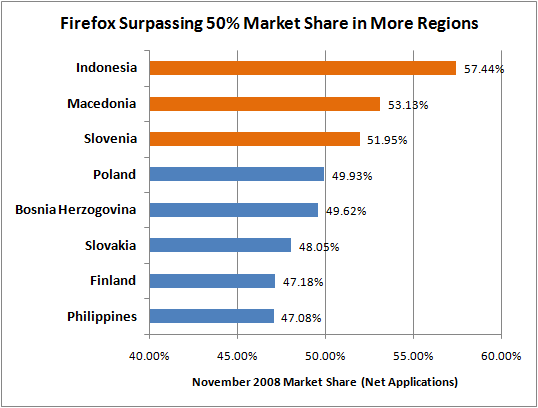
Firefox Surpassing 50% Market Share in More Regions

On top of today’s exceptional news about Firefox surpassing 20% worldwide market share during the month of November, we have further good news to share. After Firefox reached the 50% market share milestone in Indonesia back in July, we can now say the same about two more regions: Slovenia and Macedonia. Below you’ll find the November 2008 numbers according to Net Applications.

What’s the key takeaway here?

Our market share in the regions above has been growing like crazy. For example, since our July announcement about Indonesia, we’ve seen Firefox’s share in Indonesia pick up another 7%, Slovenia 4%, Slovakia 5%, and the Philippines an astounding 13%!

A tremendous amount of credit here goes to the Mozilla community. John Lilly summed it up best: “The open web is more vibrant than ever, and the thousands of Mozilla contributors around the world have played a major role in making it that way.”

Resource - Blog of Metrics

Obama-Biden transition site Change.gov now under a Creative Commons license

Change.gov, the website of US president-elect Barack Obama’s transition team, has undergone some important and exciting changes over the past few days. Among them is the site’s new copyright notice, which expresses that the bulk of Change.gov is published under the most permissive of Creative Commons copyright licenses - CC BY.

Except where otherwise noted, content on this site is licensed under a Creative Commons Attribution 3.0 License. Content includes all materials posted by the Obama-Biden Transition project. Visitors to this website agree to grant a non-exclusive, irrevocable, royalty-free license to the rest of the world for their submissions to Change.gov under the Creative Commons Attribution 3.0 License.

This is great news and a encouraging sign that the new administration has a clear sense of the importance of openness in government and on the web (there’s a bit more on this over at Lessig’s blog). The embrace of Creative Commons licensing on Change.gov is consistent with earlier support by both Obama and McCain for the idea of “open debates.” (It’s also in line with Obama’s decision to publish the pictures in his Flickr Photostream under a Creative Commons BY-NC-SA license - pretty cool!)

Tim O’Reilly has written a smart post (which has elicited some very thoughtful reader comments) recommending that Change.gov use revision control as a way to further improve transparency and make it possible for the public to review any changes that occur on the site. Of course, licensing is just one component of openness, but getting licensing right is necessary for enabling people to truly take advantage of technologies that facilitate collaboration.

Update: Several people have pointed out that “works created by an agency of the United States government are public domain at the moment of creation” (see Wikipedia for more on this). Change.gov is not currently the project of a government agency, but a 501(c)(4) that has been set up to manage the Obama-Biden transition. Also, the public is being invited to contribute their own comments and works to the site, and it is important to have a clear marking of the permissions that other people have to this material.

Resource - Creative Commons

SixApart Hires Pownce Founders, Closes Service


The team behind microblogging service Pownce announced on the company blog today that it is joining blog software company SixApart and closing Pownce in two weeks. Pownce left private beta with a big launch just 11 months ago but the service never grew beyond a core group of fans.

The Pownce team says it plans to "come back with something much better in 2009." We're excited to see what Pownce co-founders Leah Culver and Mike Malone do at SixApart; it should be a very good environment for them to innovate in.

This is the second move where well known innovators have taken their technology and brains to a bigger company and shuttered their startup that we've reported on in a week. Last week open source star Rael Dornfest sold his personal assistant startup Sandy to Twitter.

Though these startups were inspiring, we also think it quite noteworthy that even at a down time economically there are still jobs for super smart people. We covered the Pownce/SixApart deal in greater depth at our hire-tracking site Jobwire. See that coverage for more details about the technology that Pownce will bring to SixApart.

Resource - Pownce Blog

Beta release: 0.4.154.25

Google Chrome version 0.4.154.25 has been released. You will automatically get updated in the next few days. You can open About Google Chrome (from the wrench menu) to get the update at any time.

This is a roll up of fixes that have previously been released to our Dev channel users. See http://dev.chromium.org/getting-involved/dev-channel/release-notes for details on the changes that have been made since 0.3.154.9.

Note: Please use the excellent Google Chrome Help Center or file a bug to report problems. There are a lot of people watching those sites and ready to help.

New Features

  • Bookmark manager with import/export.
Use the 'Customize and control Google Chrome' (wrench) menu to open the Bookmark manager. You can search bookmarks, create folders, and drag and drop bookmarks to new locations. The Bookmark Manager's Tools menu lets you export or import bookmarks.

  • Privacy section in Options.
We grouped together all of the configuration options for features that might send data to another service. Open the wrench menu, click Options, and select the Under the Hood tab.

  • New blocked pop-up notification.
The pop-up blocker formerly just minimized pop-up windows to the lower right corner of the browser window, create one 'constrained' window for each pop-up. Now, Google Chrome displays one small notification in the corner that shows the number of blocked pop-ups. A menu on the notification lets you open a specific pop-up, if needed.

Security Issues

  • This release fixes an issue with downloaded HTML files being able to read other files on your computer and send them to sites on the Internet. We now prevent local files from connecting to the network with XMLHttpRequest() and also prompt you to confirm a download if it is an HTML file.
Severity: Moderate. If a user could be enticed to open a downloaded HTML file, this flaw could be exploited to send arbitrary files to an attacker.
[Originally fixed in 154.18]

Other Updates

Bug-fix updates (no new features) to major components:
  • Gears is updated to version 0.5.4.0 (from 0.4.24.0).
  • V8 (JavaScript engine) is updated to 0.3.9.2 (from 0.3.5.0).

--Mark Larson, Google Chrome Program Manager

Resource - Google Chrome Beta release: 0.4.154.25

Open source hardware 2008 - The definitive guide to open source hardware projects in 2008

What is open source hardware? Briefly, these are projects that creators have decided to completely publish all the source, schematics, firmware, software, bill of materials, parts list, drawings and "board" files to recreate the hardware - they also allow any use, including commercial. Similar to open source hardware like Linux, but hardware centric.

This is one of the new and emerging trends we've seen really take off over the last few years. Each year we do a guide to all open source hardware and this year there are over 60 projects/kits - it's incredible! Many are familiar with Arduino (now shipping over 60,000 units) but there are many other projects just as exciting and filled with amazing communities - we think we've captured nearly all of them in this list. Some of these projects and kits are available from MAKE others from the makers themselves or other hardware manufacturers - but since it's open source hardware you can make any of these yourself, everything is available.

You can also call this guide... "The Open source hardware gift guide - The one and only, 3rd annual celebration of open source hardware!" - we think these are some of the best things to consider for the holidays and it supports an exciting development in hardware design.

So sit back and get ready to scroll through the list! Here we go!


Mksp4-2
Arduino Duemilanove - The new classic
Arduino is a tool for making computers that can sense and control more of the physical world than your desktop computer. It's an open-source physical computing platform based on a simple microcontroller board, and a development environment for writing software for the board. "Duemilanove" means 2009 in Italian and is named after the year of its release. The Duemilanove is the latest in a series of USB Arduino boards.

Features:

  • Microcontroller ATmega168
  • Operating Voltage 5V
  • Input Voltage (recommended) 7-12V
  • Input Voltage (limits) 6-20V
  • Digital I/O Pins 14 (of which 6 provide PWM output)
  • Analog Input Pins 6
  • DC Current per I/O Pin 40 mA
  • DC Current for 3.3V Pin 50 mA
  • Flash Memory 16 KB (of which 2 KB used by bootloader)
  • SRAM 1 KB
  • EEPROM 512 bytes
  • Clock Speed 16 MHz
Resource - MAKE

Windows 7 allows DirectX 10 acceleration on the CPU

Windows 7’s new WARP system can run Direct3D 10 and 10.1 on the CPU, doing away with the need for a hardware 3D accelerator in some circumstances

DirectX CPU It turns out that Intel isn’t the only company that’s looking at performing Direct3D in software; Microsoft has just announced that it’s also planning to introduce a new feature called WARP in Windows 7 that allows you to run Direct3D 10 and 10.1 on the CPU.

In what could be seen as an easy answer to the Vista-capable debacle, where there was some confusion as to what 3D graphics hardware you specifically needed to run Windows Vista’s Aero interface, Microsoft has introduced what it calls a ‘fully conformant software rasterizer’ called WARP (Windows Advanced Rasterization Platform) 10, which does away with the need for a dedicated hardware 3D accelerator altogether.

Microsoft details the new feature in this document on MSDN, in which the company says that WARP 10 will support all the features and precision requirements of Direct3D 10 and 10.1. The feature also supports up to 8x multi-sampled anti-aliasing, anisotropic filtering and all optional texture formats. The minimum CPU spec needed is just a simple 800MHz CPU, and it doesn’t even need MMX or SSE, although Microsoft says that WARP 10 will work much quicker on multi-core CPUs with SSE 4.1.

Of course, software rendering on a single desktop CPU isn’t going to be able to compete with decent dedicated 3D graphics cards when it comes to high-end games, but Microsoft has released some interesting benchmarks that show the system to be quicker than Intel’s current integrated DirectX 10 graphics. Running Crysis at 800 x 600 with the lowest quality settings, an eight-core Core i7 system managed an average frame rate of 7.36fps, compared with 5.17fps from Intel’s DirectX 10 integrated graphics.

Of course, this low level of performance isn’t going to threaten ATI and Nvidia in the world of PC gaming, but it could mean that Windows 7’s 3D desktop interface will now be accessible to everyone, whatever graphics card they own.

Microsoft says that the technology is also targeted at casual games, explaining that ‘the majority of the best selling game titles for Windows are either simulations or casual games, neither of which requires high performance graphics, but both styles of games greatly benefit from modern shader based graphics and the ability to scale on hardware if present.’ Microsoft also points out that the technology could be useful for ‘emulators and virtual environments that are attempting to display advanced 3D graphics.’
Resource - Custom PC